Home Node

How can I add someone to my Circle Of Trust?

Your circle of trust is accessible via the button "Circle of trust" in the Main Menu.

Your circle of trust in Andaman7 consists of a group of people you want to share information with. Your circle is empty by default, but you can add existing Andaman7 users to it.To add someone to your circle, you have to search for that person in the system:

English
What is a sharing rule?

Sharing a record in (fully or partially) Andaman7 is done by creating sharing rules.

A sharing rule is defined by three parameters:

  • Which record do I share
  • Who do I share with
  • Which parts (fields) of the record do I share

You first need to add the person you want to share the record with to your circle of trust

English

How can I merge records in Andaman7?

In order to merge records in your Andaman7, please select the 'My records' menu option, then tap on the top right button and first select "Find duplicates". Then, a list of duplicated entries could appear, select and merge records you finally want to merge.

If there is no records in the list, you can still do the merge by opening the record, use the top right button and choose "Merge with existing record" option. You finally just have to select the record you want to merge to the initial selected one.

English

How can I receive my health documents from the University Hospital from Liège?

Andaman7 and the University Hospital from Liège (CHU-Liège) put together a very innovating project that allows patients to receive several kinds of health-related documents directly on their smartphone!

It's free for all patients from the hospital upon simple request! Are you interested in getting your health record on your smartphone? Simply send an email to chuliege@andaman7.com to start the procedure.


English

Can I delete the data sent to someone else ?

While it's clear that the relationship with someone can reach an end at some point, Andaman7 does not allow to "remotely delete" information that was previously shared. Andaman7 works here like paper or email: once a piece of information is sent and received by the other end, it is not possible to "unsend" it (or remote delete e-mails or remote destroy paper). Beside technical difficulties, it would be pretty intrusive to remotely modify someone's data.

English

Which operating systems are you compatible with?

Andaman7 was developed to serve the vast majority of mobile users. That is why we developed our app on the 2 main operating systems: iOS (iPhones, iPad, iPod Touch) and Android (smartphones and tablets).

iOS

The latest version of the app is fully compatible with iOS 8.2 and up. Those versions of iOS cover over 90% of users We also provide an older version on the app for iOS 7 but it’s not supported anymore.

ANDROID

English

How can I backup the data stored in my Andaman7?

As of today, there are three different ways for you to make sure you get your data if you break or lose your device:

English

How can I remove a document in Andaman7?

Removing a document (image, PDF file...) is a function we call "invalidating" in Andaman7. An invalidated document will automatically disapear from your Andaman7 record. Please, take caution when you invalidate a document attached to a shared records as Andaman7 will automatically invalidate the document in the record of your peer. 

English

How can I delete one of my records?

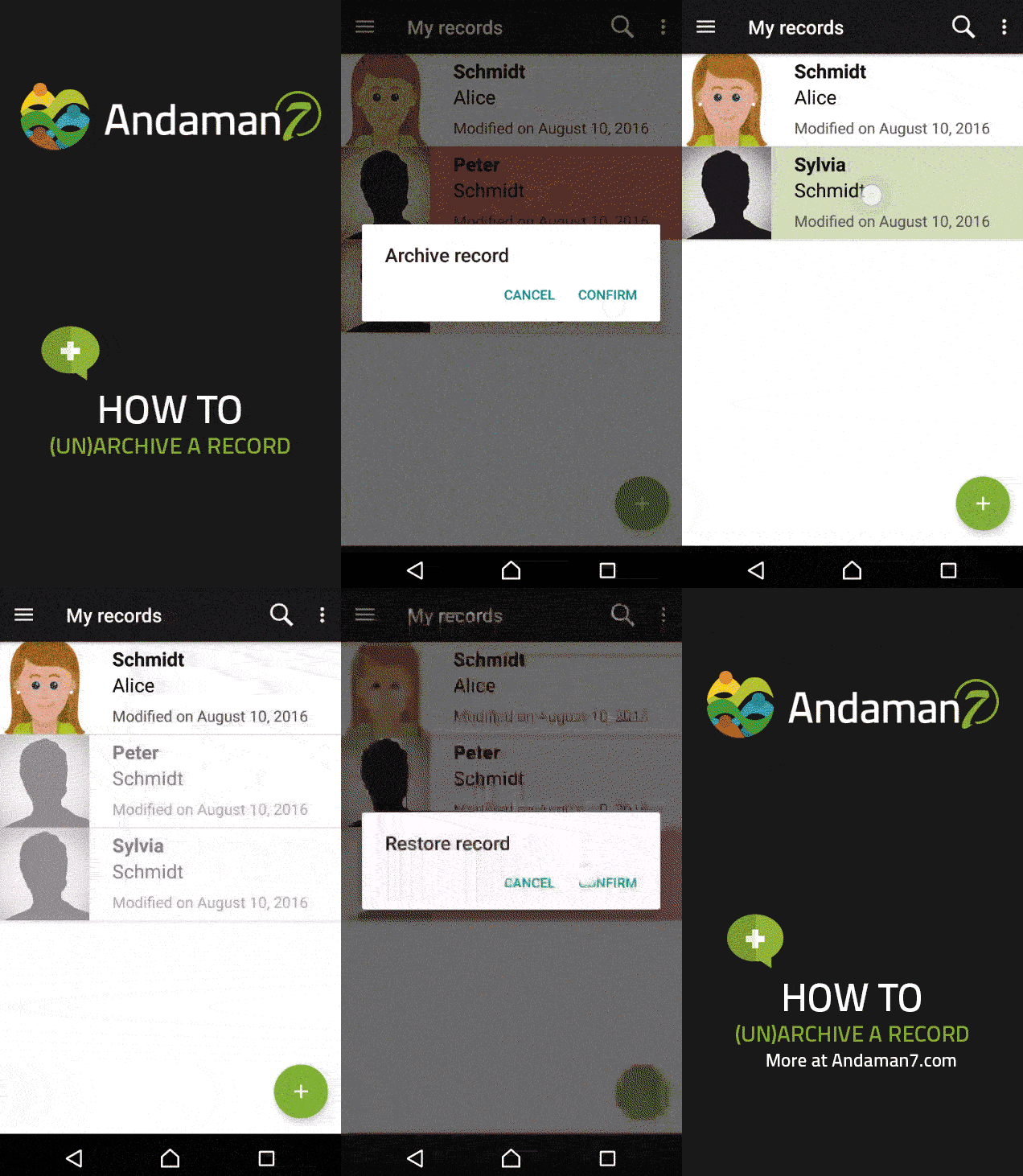
We chose to archive and not delete for now to ensure no data would get maliciously deleted.

You can archive records to remove them from your list:

  • Go to "My records"
  • Swipe left (or tap & maintain- "Long click") on the record  you wish to archive


More info regarding archived records:

English

Download Andaman7, it's free for individual users and will always be!

download Apple IOS download Android

Download app on iOS and Android download Apple IOS download Android