Android 6.4 - iOS 6.4
Description
A question comes to mind today, but your next medical visit is still a few weeks away. With Andaman7, you can create a consultation with a future date in your personal health record and note the questions you want to ask your doctor. Build your list in advance, rather than trying to remember everything on the day.
Why is this important?
It is easy to forget a question once you are sitting in the consultation room. Preparing ahead gives you time to think about what matters most to you. Keeping your questions together can help you start the conversation and make the most of the time you have with your doctor.
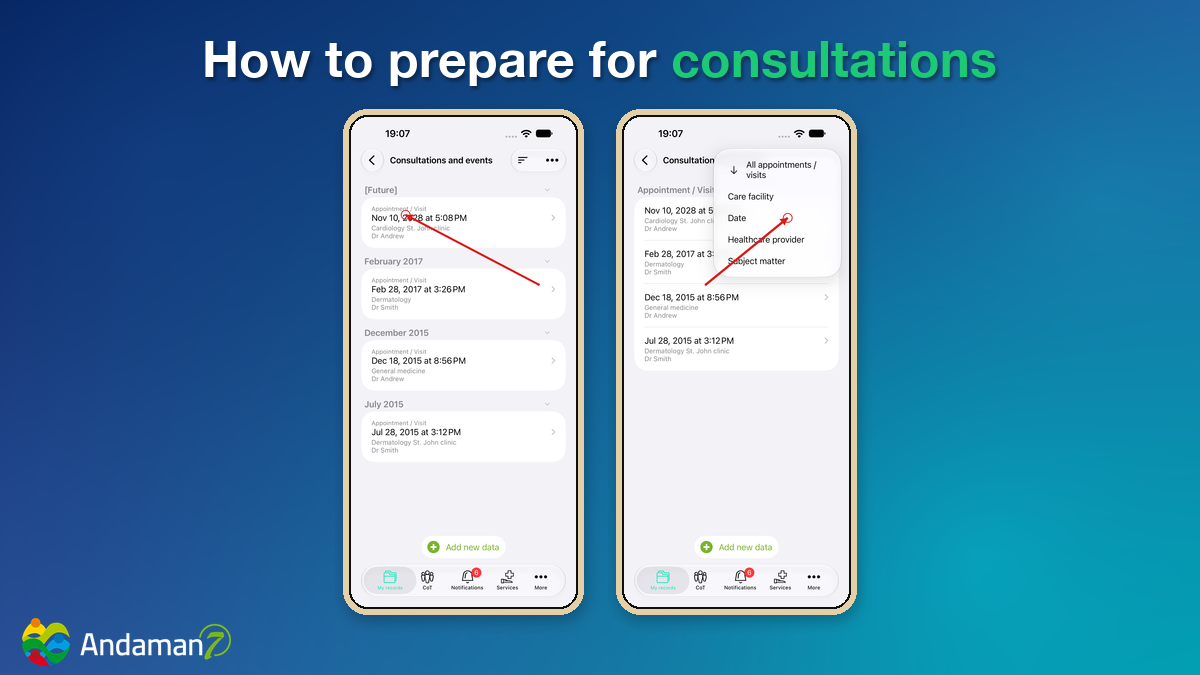
How does it work?
- Open your health record in Andaman7 and go to Consultations.
- Create a consultation with a future date (add Healthcare provider, Care facility...).
- In the field "Patient questions and notes", write down the questions you would like to ask your doctor. Validate.
- Find your upcoming consultation in Future and review your questions before your visit (use the 3 lines top right to sort by Date, click Date again to sort by ascending or descending).
A few questions to get you started
- What should I understand about my latest test results?
- What changes or symptoms should I mention?
- What should I ask about my treatment?
These are examples: choose the questions that matter to you.
Creating a consultation in your health record does not book an appointment with a healthcare professional. Arrange your appointment with your care provider as usual.
Get ready for your next visit
Download Andaman7 for free, or update your app: App Store · Google Play.